
The 2026 Steam Controller: What Reviewers Are Saying
It has been ten long years (2015!) since the first Steam Controller was released, a device that was polarizing by design, beloved by hardcore users, and baffling to the average console enthusiast. The original tried to solve the fundamental friction between mouse-and-keyboard PC gaming and the traditional couch-based approach. It was discontinued back in 2019, and since then we expected it to make a come back sooner or later, especially after the Steam Deck came out and Valve signaled a renewed interest in making hardware.
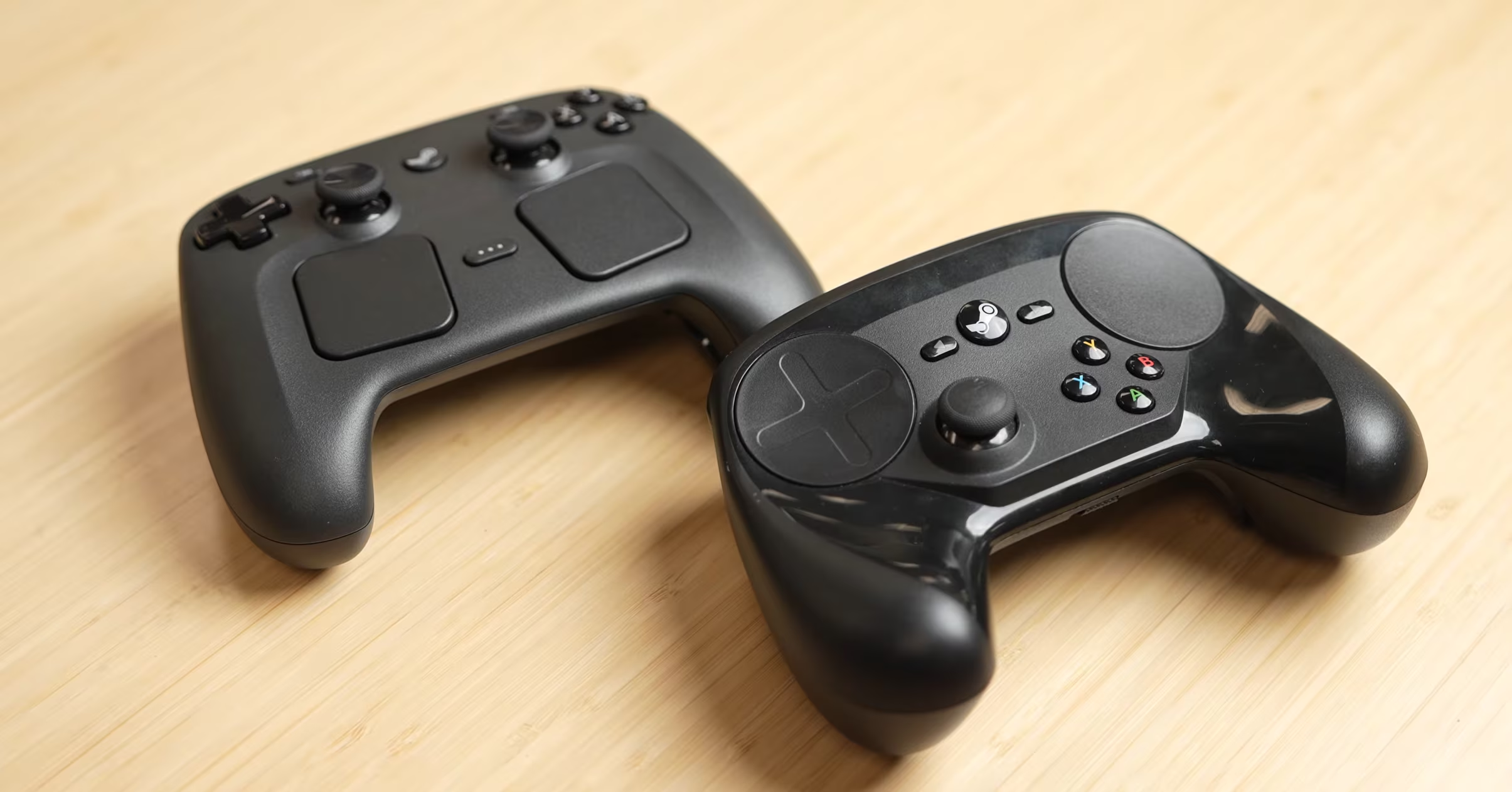
Fast forward to 2026, in the middle of the Rampocalypse shaking the hardware industry, Valve returns with a device bearing the same name, the same philosophy, but a different, and less radical execution. For better or worse, this is mostly as if the Steam Deck was turned into a controller.
Since we don’t have the new Steam Controller in hands yet, we can learn from those who do. We have spent some time checking comments hardware youtubers, specifically looking at hands-on impressions from outlets like GameSpot, Linus Tech Tips, Tested, Skillup and Gamers Nexus. From there on we will provide a summary of their observations and opinions.
The Square?
The first thing one notices when picking up the 2026 Steam Controller is its size. It is substantial. It looks nothing like the standard curvy Xbox controller, nor does it have the sleek, minimal silhouette of a DualSense. It feels wide. It feels… square.
All reviewers tend to agree about the dimensions: it is a large controller.
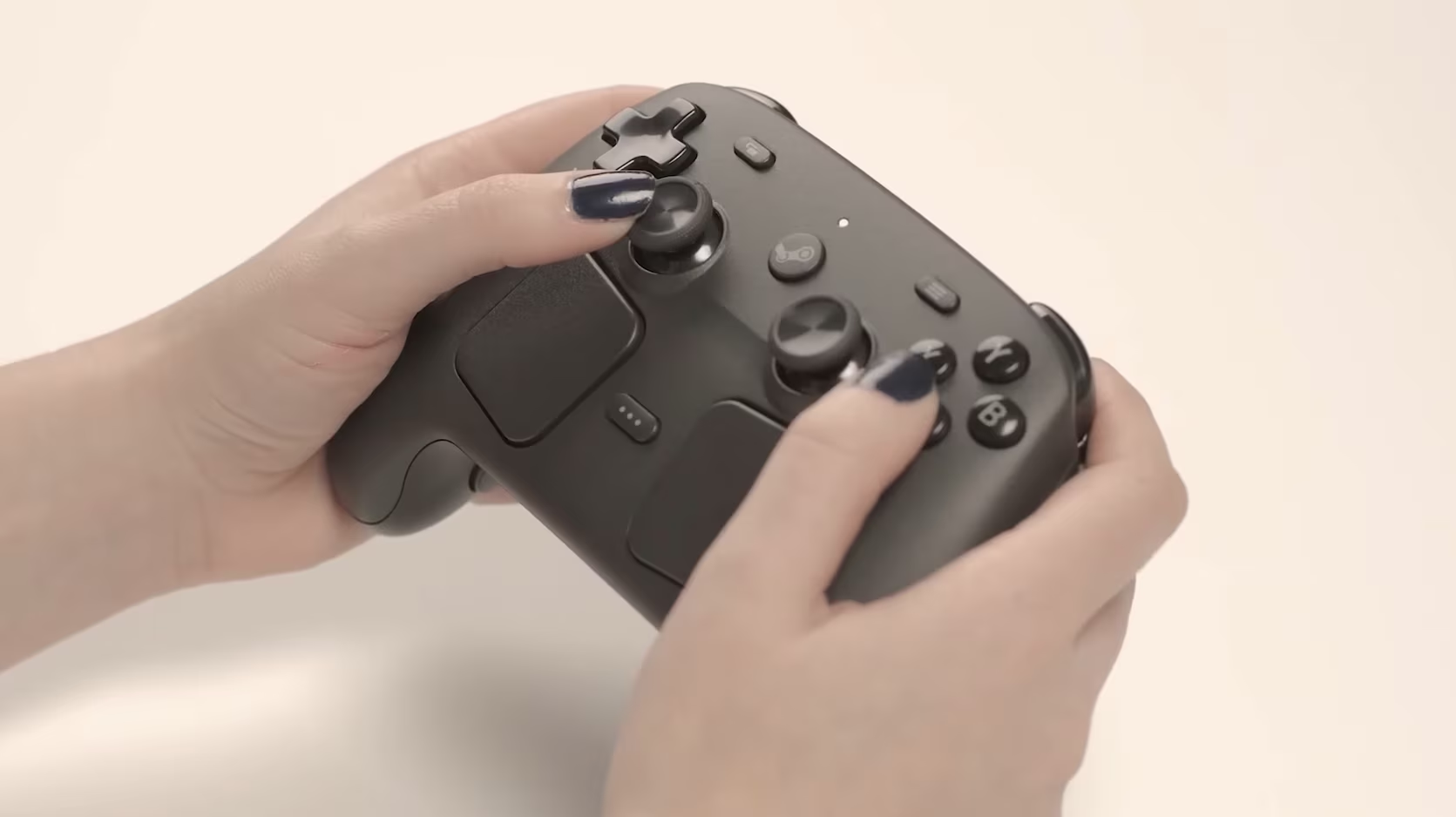
The reviewer from Skillup, who has larger hands, found the controller to be an immediate favorite. They described how their thumbs “naturally sit” on the thumbsticks, a sensation that was missing on the smaller Nintendo Switch 2 Pro controller they had been using. For them, the Steam Controller feel like a natural extension of their own hands. The symmetrical layout of the sticks was better than the asymmetrical layout of other gamepads like the Xbox one. This is a common preference among retro-gamers too.
However, Linus Tech Tips (LTT) had a very different viewpoint, highlighting the fact that your experience would vary a lot depending on your hand size. For a user with smaller hands, the Steam Controller’s design is hard to handle. LTT also noted that while holding the controller, their middle finger naturally drifted upward, finding a resting spot directly underneath the triggers.
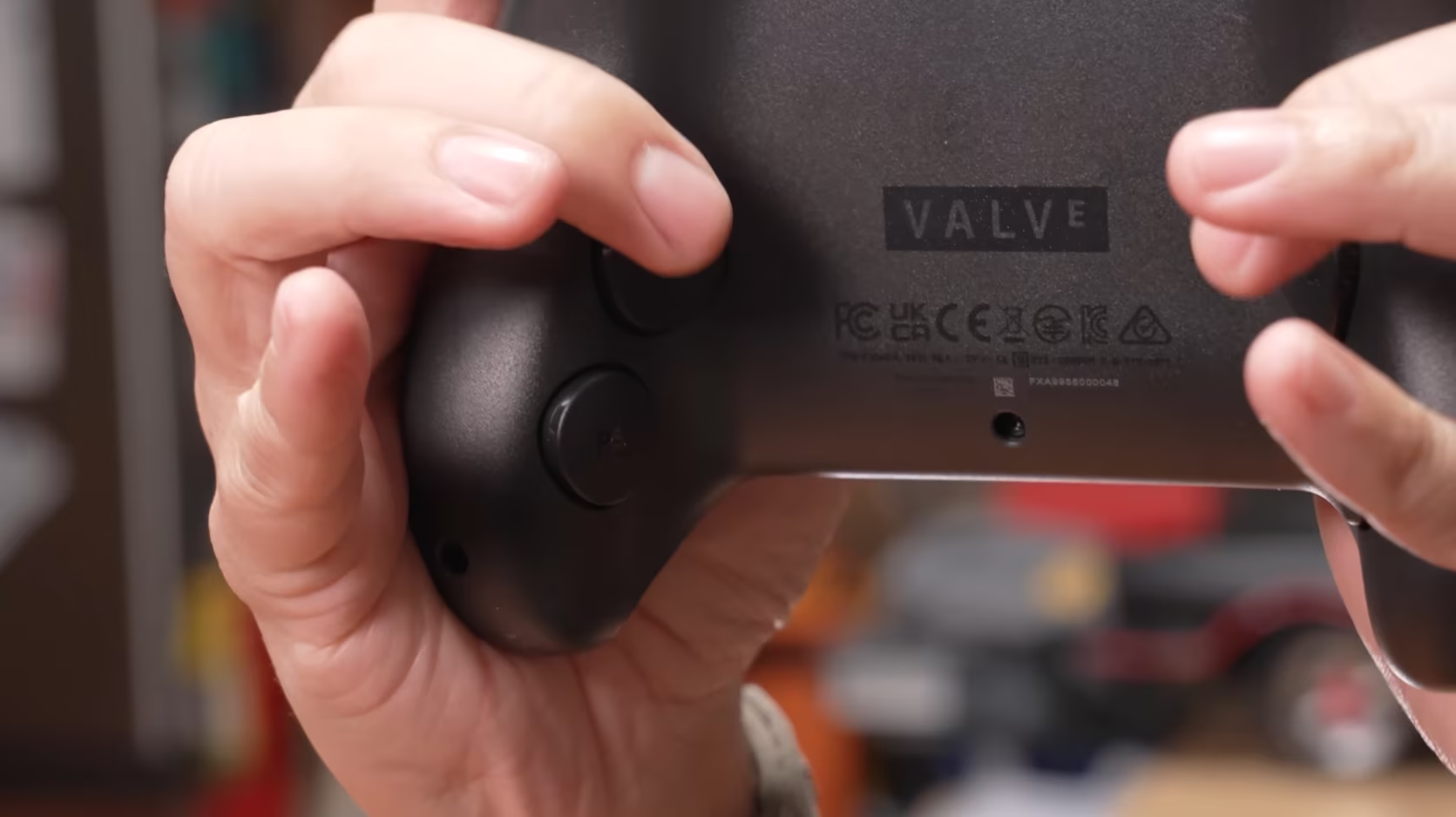
This creates something LTT described as a “finger pinch”. When pulling back on the triggers to accelerate in Forza or shooting in a shooter, the trigger mechanism occasionally grazes the middle finger. While the reviewer noted it “doesn’t pinch it to the point where it hurts”, the sensation was unpleasant. They compared this unfavorably to the DualSense or Xbox controllers, which have a more pronounced curve that tucks the triggers away from the fingers. If you have smaller hands, this is probably something you should be aware of.
The Tested team pointed out the “screw holes” on the bottom of the controller. In their tear-down and handling, they noted that the indentations for the screws are palpable. For a user who likes to hold a controller flat-handed (palm resting on the bottom face), the ridges can be irritating. Whether this is an oversight, or an intentional design choice to make it easier to maintain and repair, it can become another annoyance for some users.
Build Quality: Cheap Plastic and Elite Features
If we look past the square shape and look at the materials, there’s a lot to unpack from the reviews. The consensus was clear on one point: The plastic feels cheap.
LTT was blunt, stating that while the hardware features are premium, the materials do not scream “luxury”. The plastic is hard, smooth, and slippery. They compared it to the Switch Pro controller in terms of how slippery the texture feels. The Xbox Series X controller has, instead, proper textured grip areas, and the DualSense uses a softer-touch plastic on the top half for a better grip. The Steam Controller lacks such attention to detail. It feels like a uniform piece of hard plastic. LTT also noted that the controller felt somewhat “hollow” in the rear compared to the solid feel of the front where the trackpads are housed. This is probably a matter of center of gravity, and the fact that there is some empty space in the back to accomodate the battery.
The Skillup reviewer was in the same camp, noting they would have preferred some rubberized surfaces on the base to improve grip. However, while the material felt “cheap”, the function of the controller was an object of praise. When you look at the teardown analysis provided by Gamers Nexus and Tested, you can see that the chassis is packed with electronics, a large battery, a complex trackpad mechanism, and a wireless radio.
Making all of this easy to repair and maintain and yet fitting the components in a small space may have required a specific shell design that prioritized utility other aspects. As the saying goes: You get what you pay for, but you might not like what you got, you pay for the tech inside, not so much for the plastic shell on the outside.
While this was not mentioned in the reviews, it’s likely that we will be able to replace the bottom part of the controller with some custom-made mods, since Valve released the CAD files for the new Steam Controller.
Tunnel Magnetoresistance (TMR) for the sticks
Engineering is usually where Valve does things differently. The thumbsticks are not standard potentiometers (which wear out and drift) and they are not Hall Effect sensors either (which consume more power). They are TMR (Tunnel Magnetoresistance) sticks.
Gamers Nexus went on length on this, even producing an animation to explain the physics. TMR is an incremental evolution of magnetic sensing. Like Hall Effect, it uses magnetic fields to measure stick position without physical contact, meaning zero mechanical drift. However, TMR is significantly more power-efficient.
Why does this matter? The Steam Controller is a battery-heavy device. It has a large internal battery, haptic motors, a gyroscope, and trackpads. Using standard Hall Effect sensors would have drained the battery significantly faster. By choosing TMR, Valve has achieved a great combo of stick technology: drift resistance without the battery tax.
Reviewers confirmed the performance. The Tested reviewer noted the sticks have a pleasant tension and excellent responsiveness. The circularity tests conducted by Gamers Nexus showed that the sticks perform on par with high-end “elite” controllers (like the ones from GuliKit). The centering is precise, the dead zones can be shrunk, and the input is clean. This is a massive win for shooters where precision is key.
The Puck
Perhaps the most universally praised aspect of the 2026 Steam Controller is its “Puck”.
The Puck is the wireless dongle, also acting as the charging dock. It is a small, rectangular magnetic puck that you plug into your PC via USB-C. You then magnetically snap the back of the Steam Controller onto the Puck.
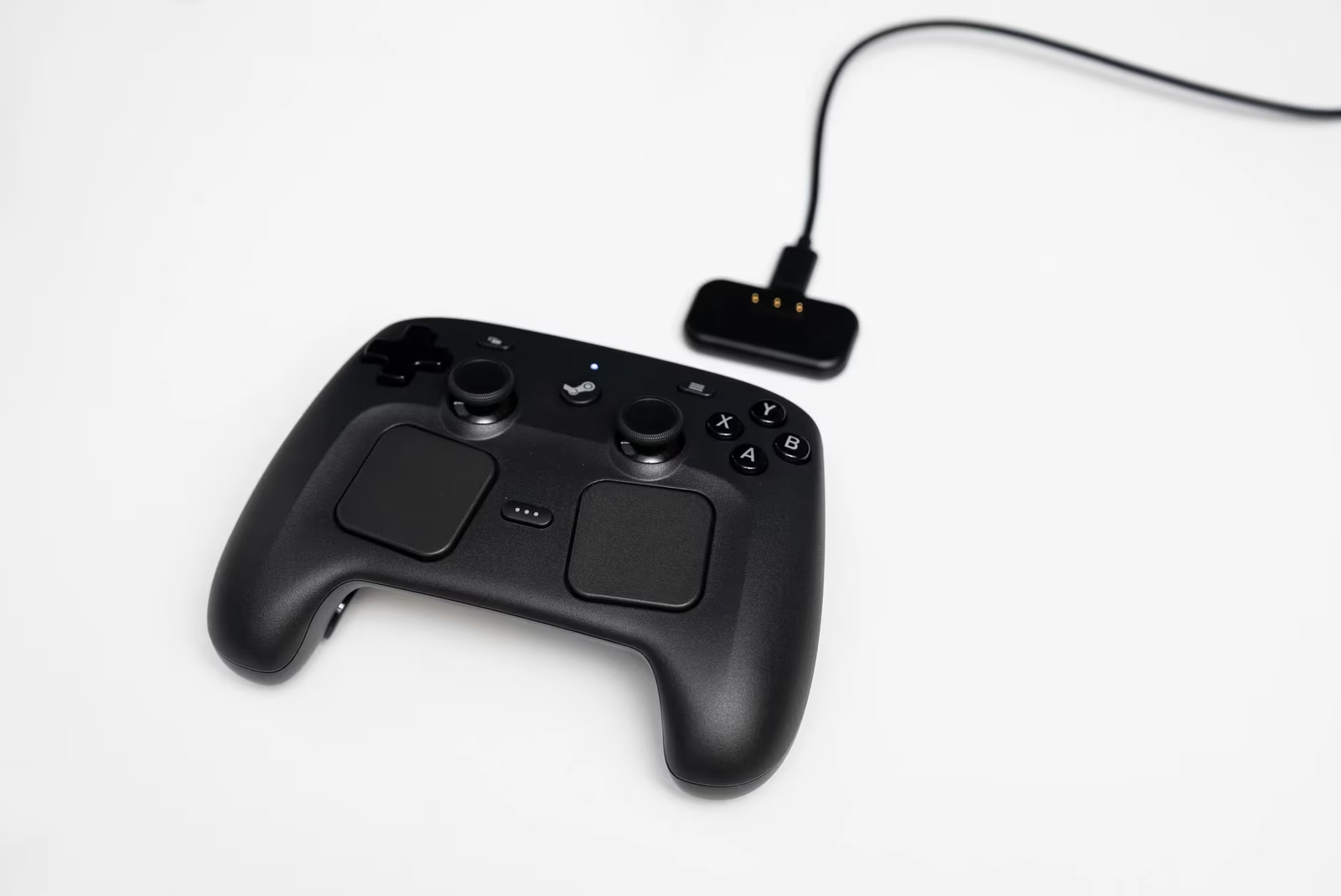
There’s nothing but praise about it. The LTT kids called it “fucking awesome” The Skillup reviewer said they never bothered stress-testing the battery because charging was so convenient they just “dropped the controller on the desk” every time.
The design solves the “two dongle problem”. Usually, you have a wireless receiver and a separate charging cable. Valve combined them. Add to that, the Puck supports up to four Steam Controllers simultaneously on a 2.4 GHz connection - very practical if you are going for a in-house party game (Mario Kart or Rocket League anyone?). If you manage to grab 4 Steam Controllers, that is. Which is right now impossible because of its non-availability.
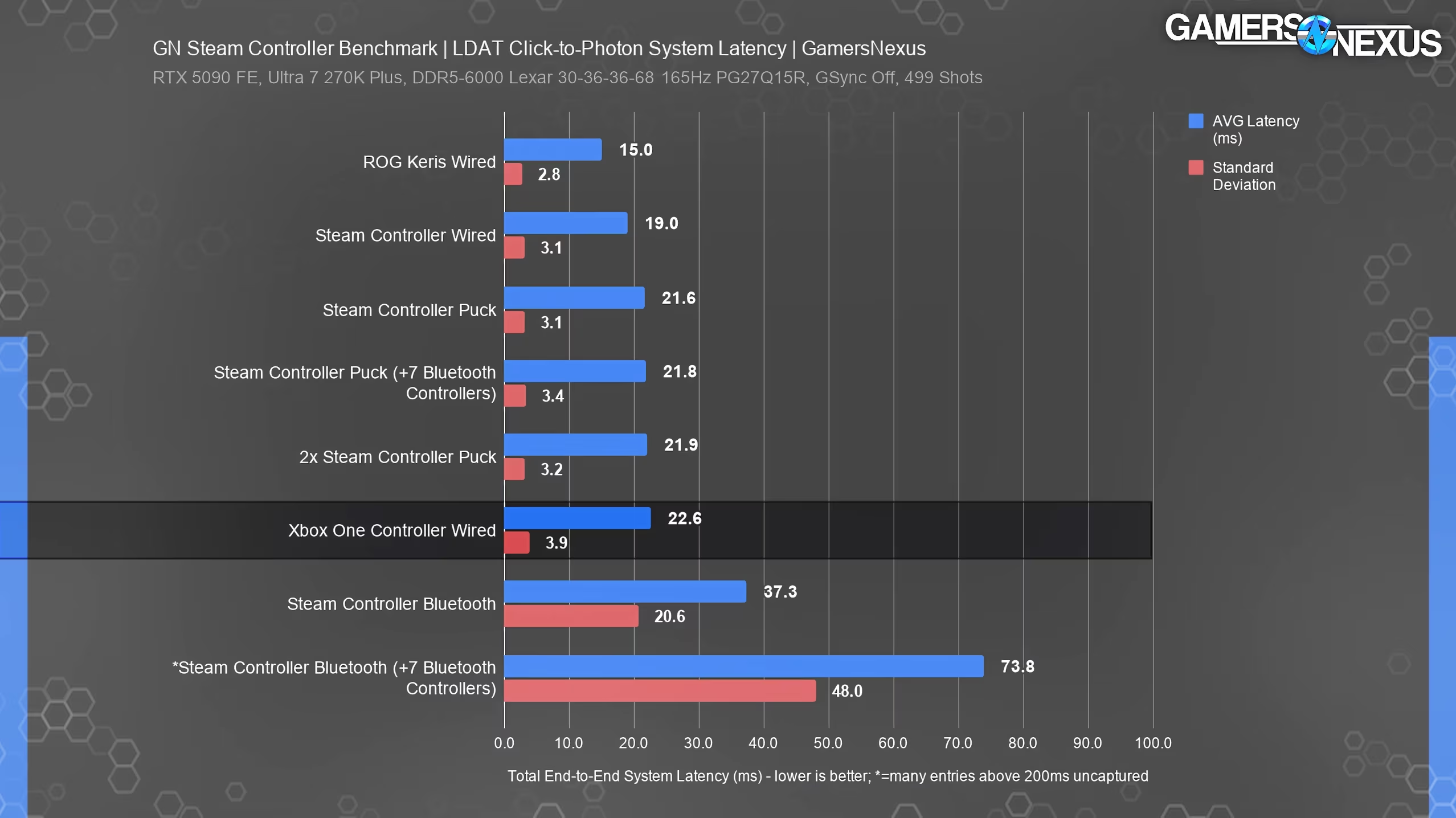
Gamers Nexus validated the wireless performance. In their latency testing, the Puck (2.4GHz) performed almost identically to a wired connection.
- Wired Latency: 19 ms average
- Puck Latency: 21.6 ms average
- Standard Deviation: 3.1ms (extremely consistent)
The only real downside to the Puck is its proprietary nature. You cannot use a third-party charging dock or a generic dongle for the 2.4 GHz connection. You need Valve’s hardware. I seem to recall this was the same thing back in the day for the older Steam Controller. You had to use the dongle that came with it.
However, you can also ignore the Puck altogether and put the controller in Bluetooth mode, apparently, using power+b+right trigger button when starting the controller. This will remain in BT mode until you switch back to the Puck connection mode.
Gyro, Grip Sense, and Steam Input
The Steam Controller is not just a pad: it is a mouse and keyboard simulator. It features a high-fidelity gyroscope (6-axis motion sensing) and “Grip Sense” capacitive sensors on the handles.
Grip Sense detects when you are holding the controller. This is used to toggle Gyro aiming. For example, you can configure the controller so that when you grip it with both hands, the Gyro activates to control your aim. When you let go (to reload), the Gyro deactivates so you don’t accidentally spin the camera while moving your arms to fire the buttons.
The Tested reviewer found this incredibly intuitive. They configured Doom to use Grip Sense for Gyro aiming. The result was precise control without the “drift” issues associated with always-on gyros. It allows the controller to be used as a precision aiming device (for shooters) and a standard controller (for driving or platforming) simultaneously.
However, reviewers diverted on how essential this feature is. The LTT reviewer admitted not being big on FPS and found the setup process for these bindings to be complex. This touches on the core philosophy of the Steam Controller: It requires configuration.
Valve is betting on “Steam Input” to handle the configuration piece. The Steam Controller assumes you will use the Steam Client. If you want to play a non-Steam game (like a BattleNet title), you must add it to Steam as a non-Steam game to get the controller mapping functionality. The Skillup reviewer noted that trying to use it with Diablo IV directly through the BattleNet launcher failed; it only worked once added to Steam. Which is not surprising, this is always how Steam Input has worked.
For the Linux/SteamOS user, this is a non-issue. For the Windows PC gamer, it is a hurdle. The controller relies heavily on the Steam Client running in the background to manage its advanced features. Without Steam, it reverts to a generic gamepad.
The Trackpads: Good Mouse Replacements?
The trackpads return from the original 2015 controller, and they have been refined. They are flatter, larger, and feature haptic clicks. Apparently even slightly larger than what you find on the Steam Deck.
The LTT reviewer was particularly impressed by the trackpads, calling them a “lifesaver”. He demonstrated playing Anno, a game that is notoriously difficult to play on a standard controller, and found it completely playable on the couch.
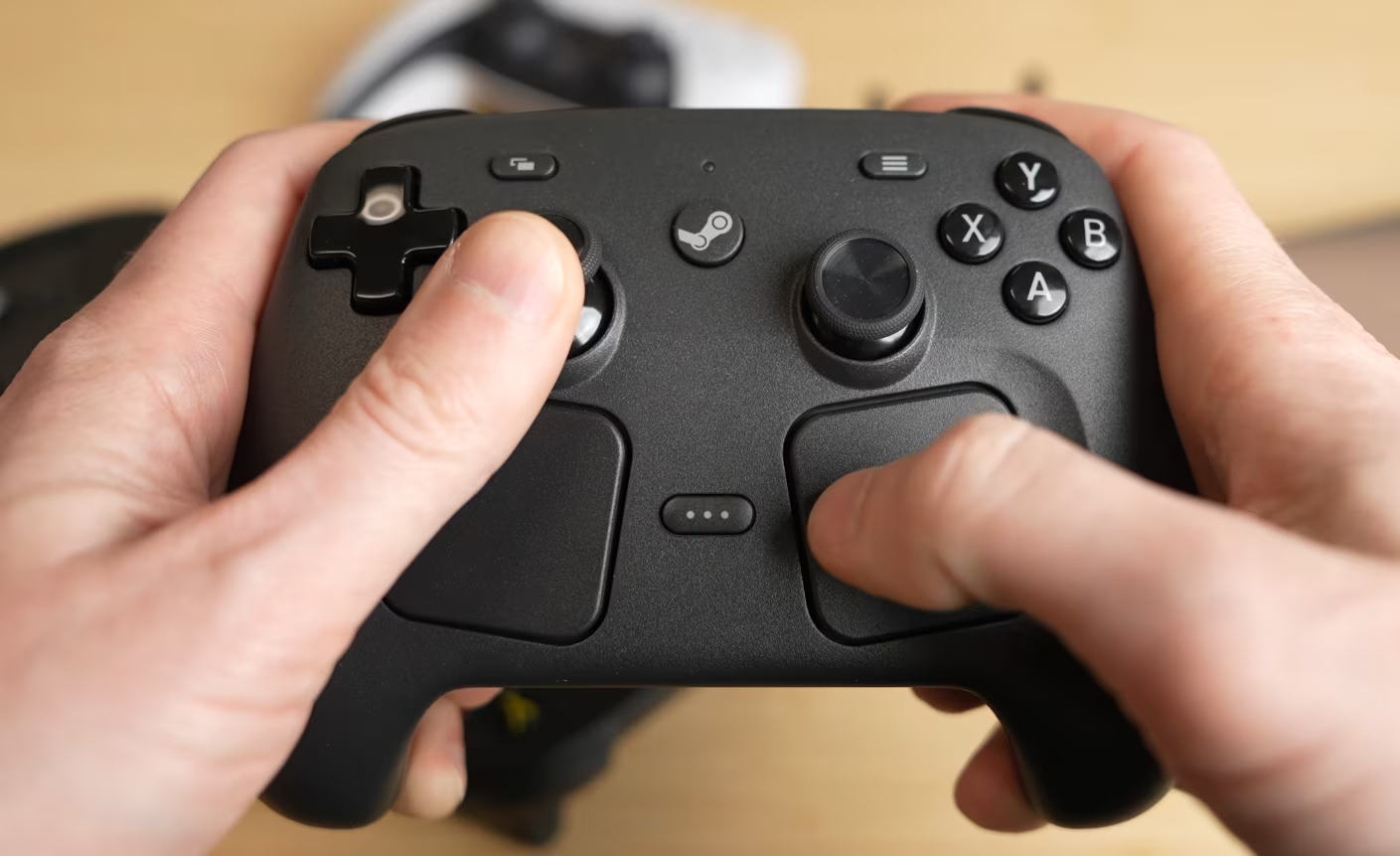
The consensus is that the trackpads are best-in-class for navigating UI and menus. But there is a split on their use in gaming:
- The Enthusiast View: The trackpads are superior for mouse-aiming in shooters (like Skate or Counter-Strike). They offer a level of precision that thumbsticks cannot match.
- The Skeptic View: The Tested reviewer noted that they prefer using the Gyro for precision aiming and felt the trackpads were solving a problem that perhaps didn’t exist anymore. He felt many modern AAA games are well-optimized for standard controllers, making the trackpad a “crutch” for older, less-friendly ports.
Ultimately, the trackpads are the “wild card” of the device. If you use them, they are magical. If you don’t, they are dead weight on the front of your controller.
Battery Life and Repairability: A Class Apart
In an era of glued-shut electronics (Steam Deck included with its glued battery!), Valve has doubled down on their support for repairability.
Gamers Nexus and Tested both opened up the unit. The controller uses standard Torx screws (no security screws). The battery is not glued in, it sits in a tray and can be popped out. iFixit has already confirmed they will sell replacement parts. This ensures the controller can last for years, mitigating the high upfront cost.
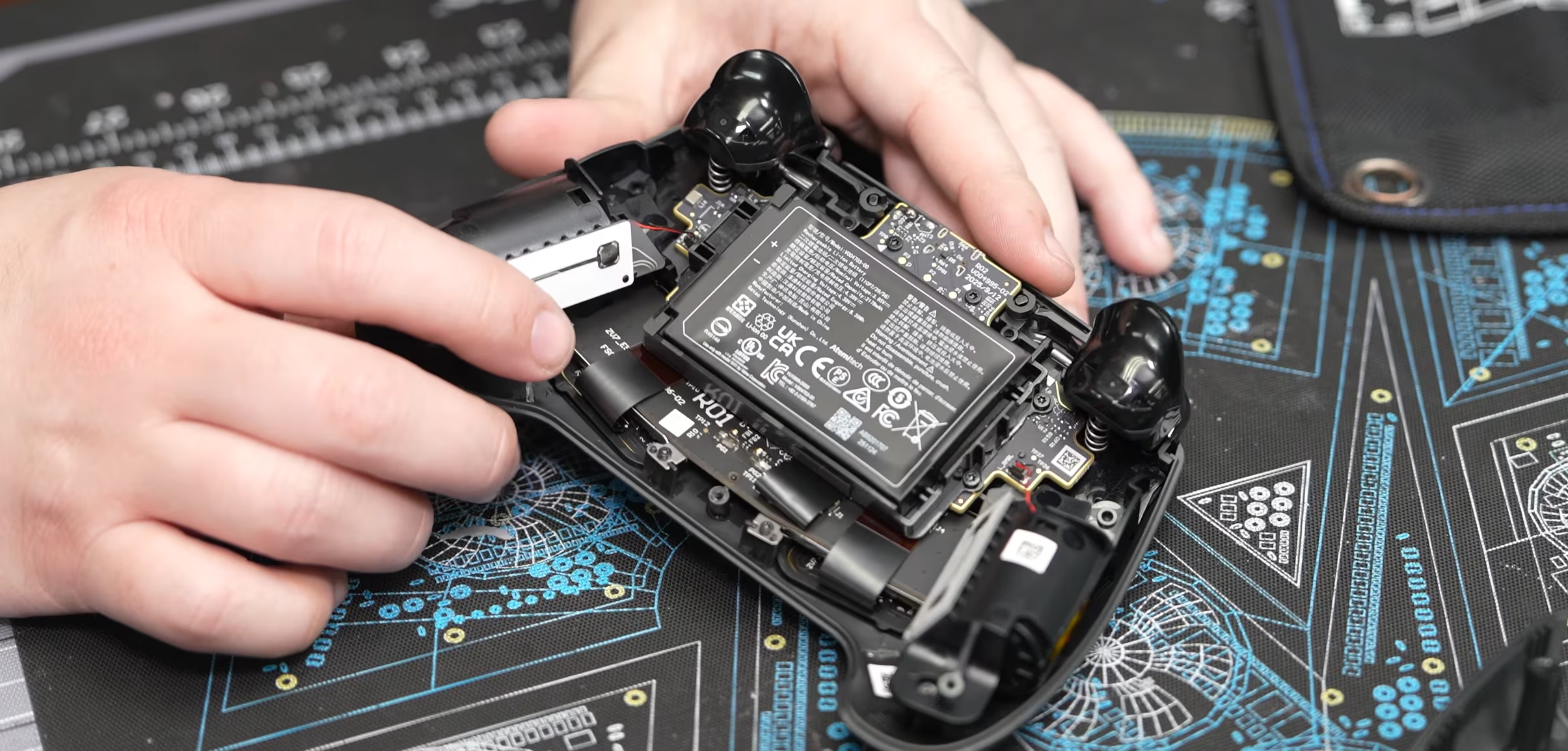
Regarding battery life, the Gamers Nexus test was… well, inconclusive because the battery was too good! They set the controller to spam inputs with haptics enabled and let it run. It lasted nearly 73 hours in that test. Even with heavy gaming, they estimated it would easily exceed the 35-hour rating Valve claims. The reviewer joked that they couldn’t finish their battery test because they ran out of time in the review window. I guess that’s a good sign.
In terms of repairability, this is easily best on the market, because nobody else is even trying in this category. If a thumbstick breaks, you replace it. If the battery degrades in 5 years, you replace it. This longevity could be a good way to explain the higher price at purchase: you are in it for the long run.
Feelings about the $100 Pricepoint
Nothing’s free and the cost of the Steam Controller is not on the cheaper side. The MSRP is $100 USD (and higher in some regions, like Canada).
Critics, including LTT, immediately flagged the price. They noted that the DualSense (PS5 controller) offers a similar breadth of features (haptics, triggers, premium materials) for a lower price. They argued the plastic on the Steam Controller feels cheaper than the DualSense, making the premium price hard to swallow.
However, this needs some context. The Steam Controller is not competing with the default DualSense. It is competing with the Elite controllers or high-end PC peripherals, based on these features:
- It includes a wireless dongle (Puck).
- It includes 4 back paddles.
- It includes TMR sticks (usually only found on premium models).
- It includes extensive Gyro support.
- It is fully repairable.
The SkillUp reviewer argued that it is “fairly priced” given the feature density. Gamers Nexus suggested that the engineering cost is likely high, given the custom nature of some inputs.
Some people may consider this controller as a “gateway drug” for Valve’s ecosystem (which is good or bad, based on which camp you are in). The Steam Controller is likely the stepping stone to the Steam Machine (which will eventually bundle one). If you buy the Steam Machine, the controller adds value to the console. If you are just buying it for your current gaming PC, it is an expensive upgrade from a $60 Xbox pad, unless you specifically want the customization that Xbox pads simply do not offer, and you like playing keyboard/mouse-controlled games from the couch. Fundamentally, the value proposition is pretty much the same as 10 years ago. But it’s better now.
The Missing Features: What Valve Left Behind
Despite the praise, there are some important features missing from this gamepad.
- No Adaptive Triggers: Unlike the DualSense or the Xbox Elite Series 2, the triggers are standard mechanical triggers. The Tested reviewer noted a regression from the original 2015 Steam Controller, which had 2-stage triggers. The 2026 version does not.
- No Speaker: You cannot hear controller sounds.
- No 3.5mm Jack: This is a surprise for a device designed for couch gaming. You are reliant on your PC or TV’s audio. Less of a problem these days with BT being everywhere, I guess.
- Steam Dependency: As mentioned, the magic of the controller is in Steam Input. Using it outside the Steam ecosystem strips it of its soul.
Almost Perfect?
If we synthesize the feedback from all the reviewers, the picture is fairly clear. The 2026 Steam Controller is a very cool piece of engineering, with some compromises in terms of design.
It is the most feature-rich controller on the market. The TMR sticks will get rid of drift issues for years to come. The Gyro and Grip Sense provide a level of control that is genuinely revolutionary for shooters. The Puck is a smart mix of convenience and performance. The repairability focus ensures it will outlive the next three generations of consoles.
However, it is not for everyone. The square ergonomics will not suit everyone’s hands (particularly smaller hands). The plastic finish feels too simple, bordering on cheap. And the price is somewhat of a barrier.
For the Linux user, the Steam Deck owner, or the Steam Machine pre-orderer, this is probably the ultimate peripheral. It bridges the gap between the handheld and the desktop perfectly. But for the casual PC gamer who just wants to plug a controller into Windows and play Call of Duty without tweaking bindings? A standard Xbox controller will do just fine.
Valve has built a device for enthusiasts. A device for tinkerers. And despite the slippery plastic and the high price tag, they seem to have done it exceptionally well again.
Video sources: