
OrangePi 4 Pro Review
It’s time for us to review yet another ARM64 board, after the previous OrangePi 5 Ultra and the very powerful OrangePi 6 Plus. This time we go for their mid-range option, the OrangePi 4 Pro.
In the OrangePi lineup in 2026, the Orange Pi 4 Pro is comfortably in an unique Middle Ground position. It bridges the gap between the budget-friendly Orange Pi 3/Zero series and the high-performance Orange Pi 5/6 flagship models. While older “4” series boards (like the 4 LTS) used the aging RK3399 chip, the OrangePi 4 Pro features the newer Allwinner A733 SoC. This gives it modern “Big-Little” processing power (2× Cortex-A76 and 6× Cortex-A55 cores) and a 3 TOPS NPU, making it faster than the base Orange Pi 4, while being more power-efficient and affordable than the faster models (5 and 6 series). Let’s have a first look at the specs in details.
Specs
Here are the specifications for the Orange Pi 4 Pro:
| Component | Specification |
|---|---|
| SoC | Allwinner A733 (Octa-core 64-bit) |
| CPU Architecture | 2× Cortex-A76 (@ 2.0GHz) + 6× Cortex-A55 (@ 1.8GHz) |
| GPU | Imagination BXM-4-64 (Supports OpenGL ES 3.2, Vulkan 1.2, OpenCL 3.0) |
| NPU (AI) | Up to 3 TOPS (Supports INT8/INT16/FP16/BF16) |
| RAM | 4GB / 8GB / 12GB / 16GB LPDDR5 |
| Storage | M.2 M-Key (PCIe 3.0 x1 NVMe), MicroSD slot, eMMC/UFS module connector |
| Networking | 1× Gigabit Ethernet (supports PoE with external HAT) |
| Wireless | Onboard Wi-Fi 6 + Bluetooth 5.4 (supports BLE) |
| Video Output | 1× HDMI 2.0 (4K@60Hz), 1× 4-lane MIPI DSI |
| USB Ports | 1× USB 3.0 Type-A, 3× USB 2.0 Type-A, 1× USB Type-C (Power/OTG) |
| Camera (MIPI) | 1× 4-lane MIPI CSI + 1× 2-lane MIPI CSI |
| Expansion | 40-pin GPIO header (UART, I2C, SPI, PWM, etc.) |
| Audio | 3.5mm Headphone/Mic jack, Onboard MIC, Speaker header |
| Power Supply | 5V / 3A via USB Type-C |
| Dimensions | 89mm × 56mm (Standard “Credit Card” form factor) |
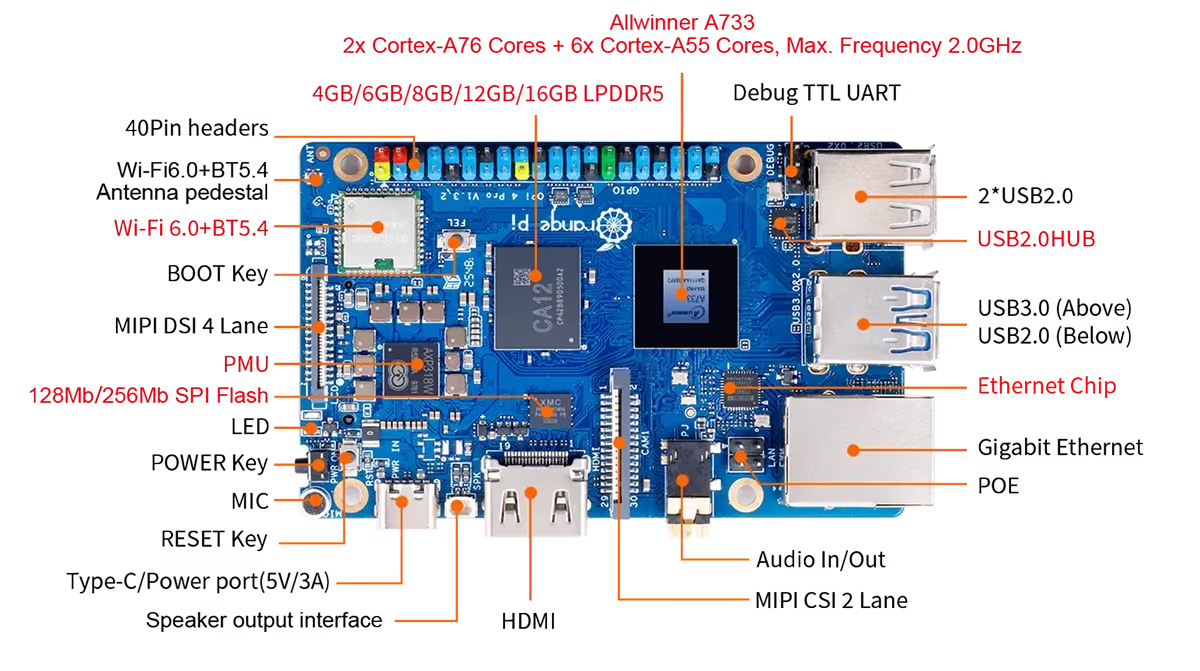
Here is what the board looks like from the top…
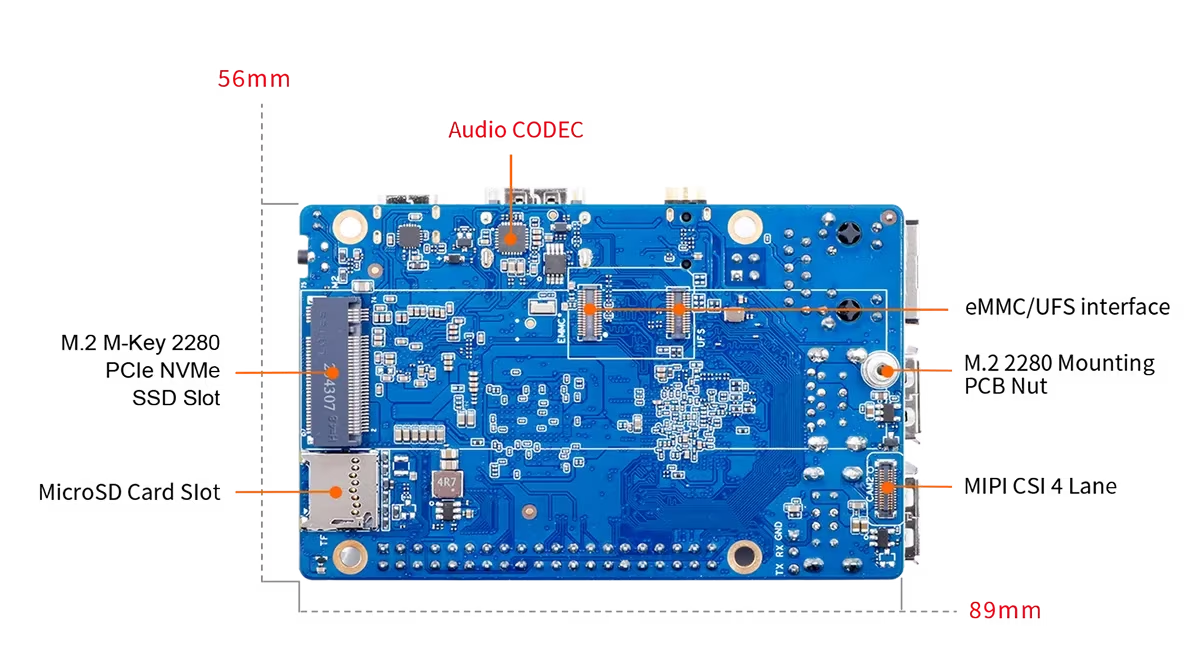
And the bottom view as well:
This new Orange Pi 4 Pro model is a serious upgrade over the original Orange Pi 4 and subsequent Orange Pi 4 LTS. The biggest change is the move from the aging Rockchip RK3399 to the newer Allwinner A733 processor.
| Feature | Orange Pi 4 / 4B (2019) | Orange Pi 4 LTS (2022) | Orange Pi 4 Pro (2025/26) |
|---|---|---|---|
| SoC | Rockchip RK3399 | Rockchip RK3399 | Allwinner A733 |
| CPU Architecture | 2× A72 + 4× A53 | 2× A72 + 4× A53 | 2× A76 + 6× A55 |
| Max RAM | 4GB LPDDR4 | 4GB LPDDR4 | 16GB LPDDR5 |
| AI (NPU) | None (2.8 TOPS on 4B) | None | 3.0 TOPS (Integrated) |
| Storage Speed | eMMC 5.1 / MicroSD | eMMC 5.1 / MicroSD | PCIe 3.0 NVMe / UFS |
| Wi-Fi / BT | Wi-Fi 5 / BT 5.0 | Wi-Fi 5 / BT 5.0 | Wi-Fi 6 / BT 5.4 |
| Power | 5V/3A (Barrel/USB-C) | 5V/4A (Barrel/USB-C) | 5V/3A (USB-C) |
You also get potentially more RAM (depending on the model of your choice), a small NPU, much faster I/O interface with PCIe 3.0 and direct NVME support, modern Wi-FI and a very nice USC-C port for power (in this time and age, it’s expected). All in all it feels like a proper reboot to meet the requirements of the modern day.
Software Support
This is the usual weakness of such boards, and unfortunately this model is no exception - and things are actually a little worse than what we have seen before on the OrangePi 5 Ultra and the OrangePi 6 Plus. This time, you only get a distro with a 5.15 kernel at most (that’s from 2021 - it will be EOL in December 2026) and a fairly old Debian distribution as well.
Desktop Experience
The Debian version I chose has a XFCE desktop, which makes it at least very snappy. My Ultra-Wide screen resolution was recognized and properly supported from the get go, which is great. The main problem is that most of the software available in the repositories is pretty much outdated. If you use flatpak (for desktop applications) or docker (for server applications), you don’t really have to care that much, but still: if you try to plug modern peripherals on this boaard, the older kernel will make things less compatible for sure.
Then, there’s the problem of a lack of GPU support. There is only GPU support for an even older distro - in the Debian distro that I run which is the most recent available, you have software support for graphics (the goold old llvm pipe!). Which means you can forget about having any kind of demanding graphical applications on this machine (including games). This is what makes the OrangePi 6 Plus so impressive: the fact that is has proper GPU support and a decent VUlkan driver, making it possible to run games like Civ VI. In practice, the lack of GPU acceleration will be a big problem for playing media on the desktop. The CPU is powerful enough to play youtube videos in the browser, but certainly not in full screen. So you have to manage your expectations. And in our case, no point testing games in that environment this time.
Apart from Flatpak, another good option to have access to modern software is to use distrobox. Using distrobox, I was able to install the latest debian image within the older distro - which opens us a large amount of more recent packages that you can use seamlessly (without GPU acceleration, though). Here’s me doing some video edition in Kdenlive:
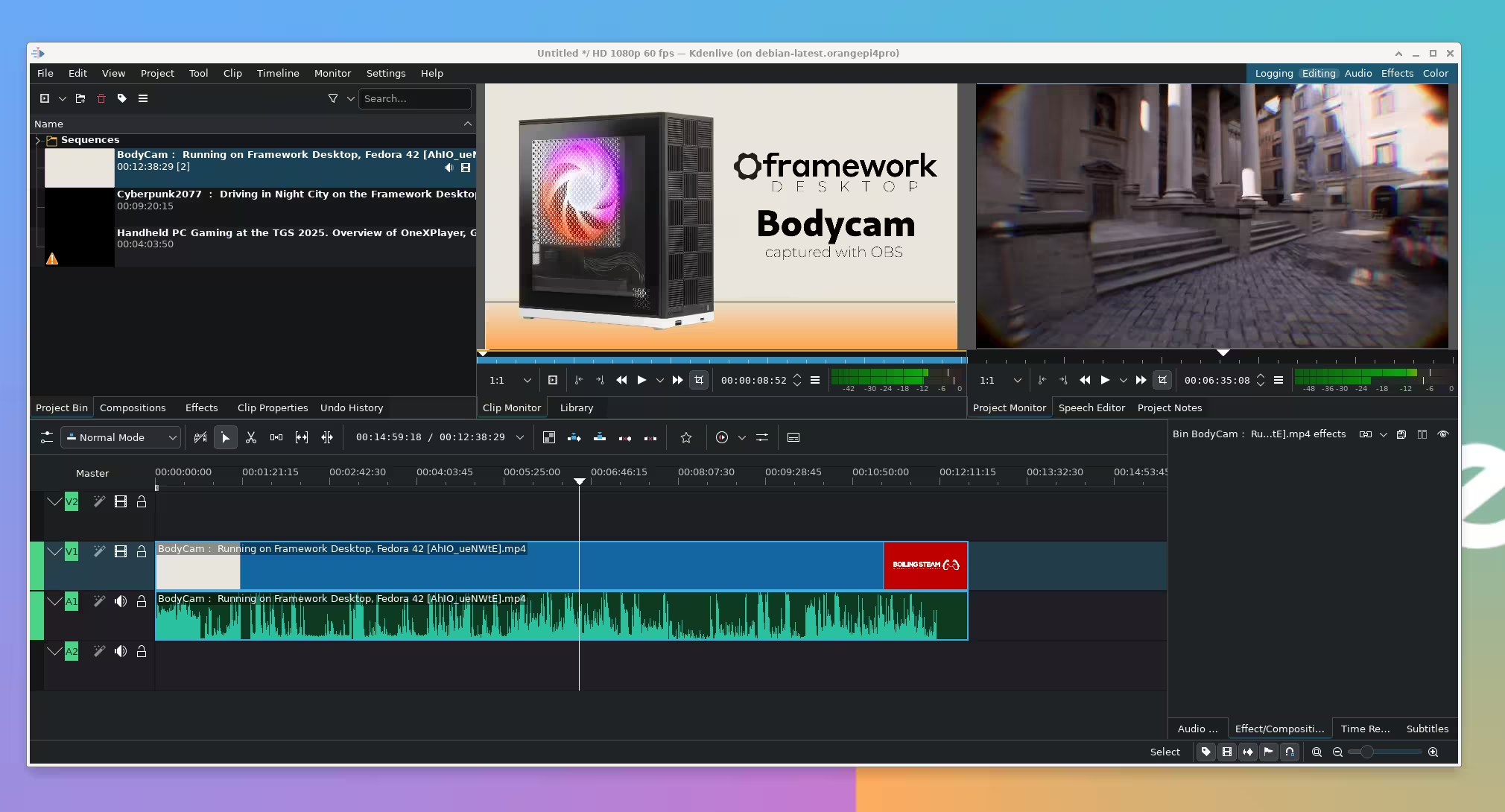
Not super smooth, as video decoding is a little slow, but you can live with it in an emergency.
In terms of performance, editing photos was nicer with Darktable and definitely a little faster, too. This is the latest version of Darktable, so you can get the latest software using distrobox.

Of course, productivity apps like LibreOffice work just as you expect them to:
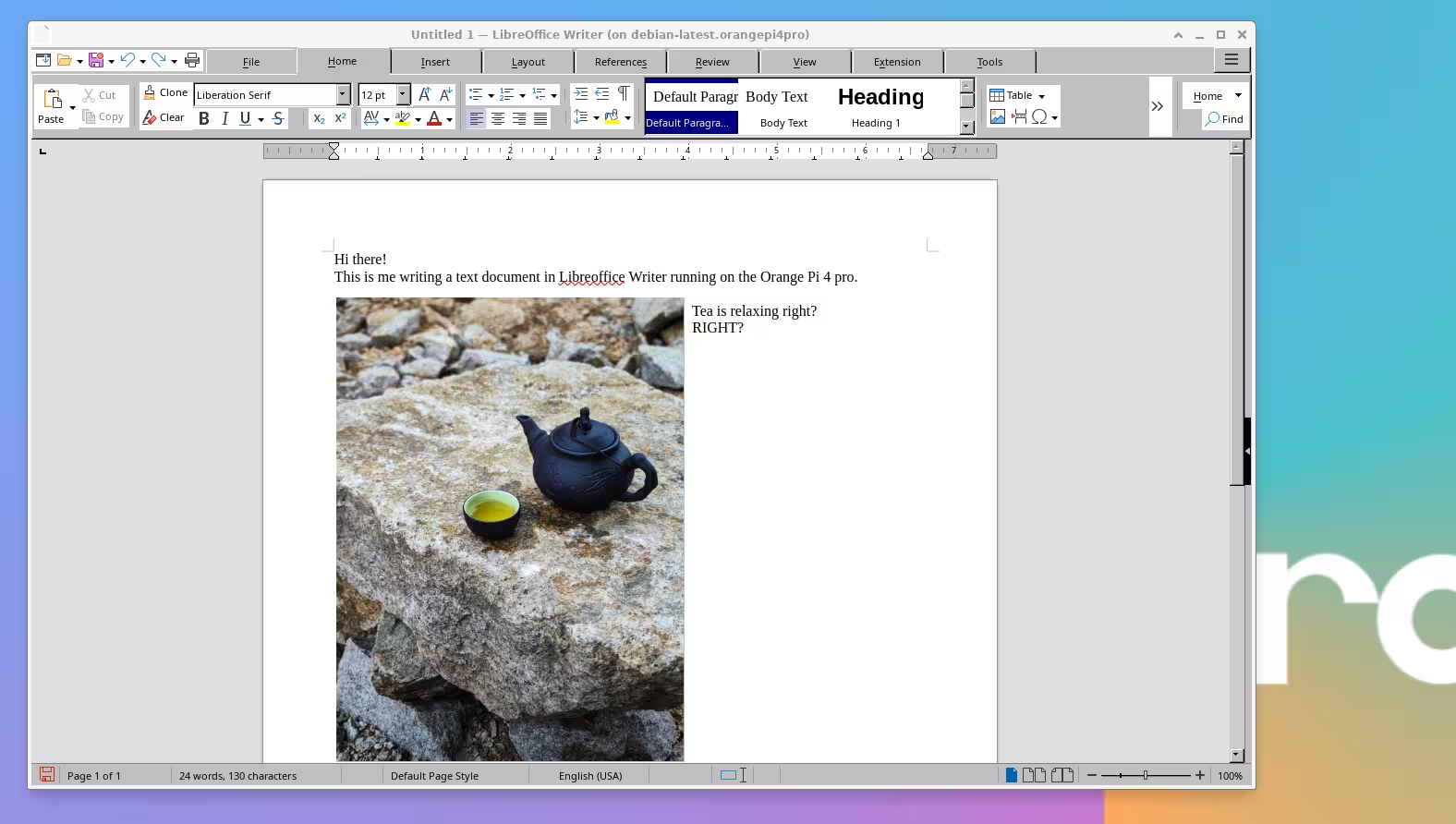
And even IDEs like Rstudio are very usable in that environment. This is how I produced some of the charts you will see below.
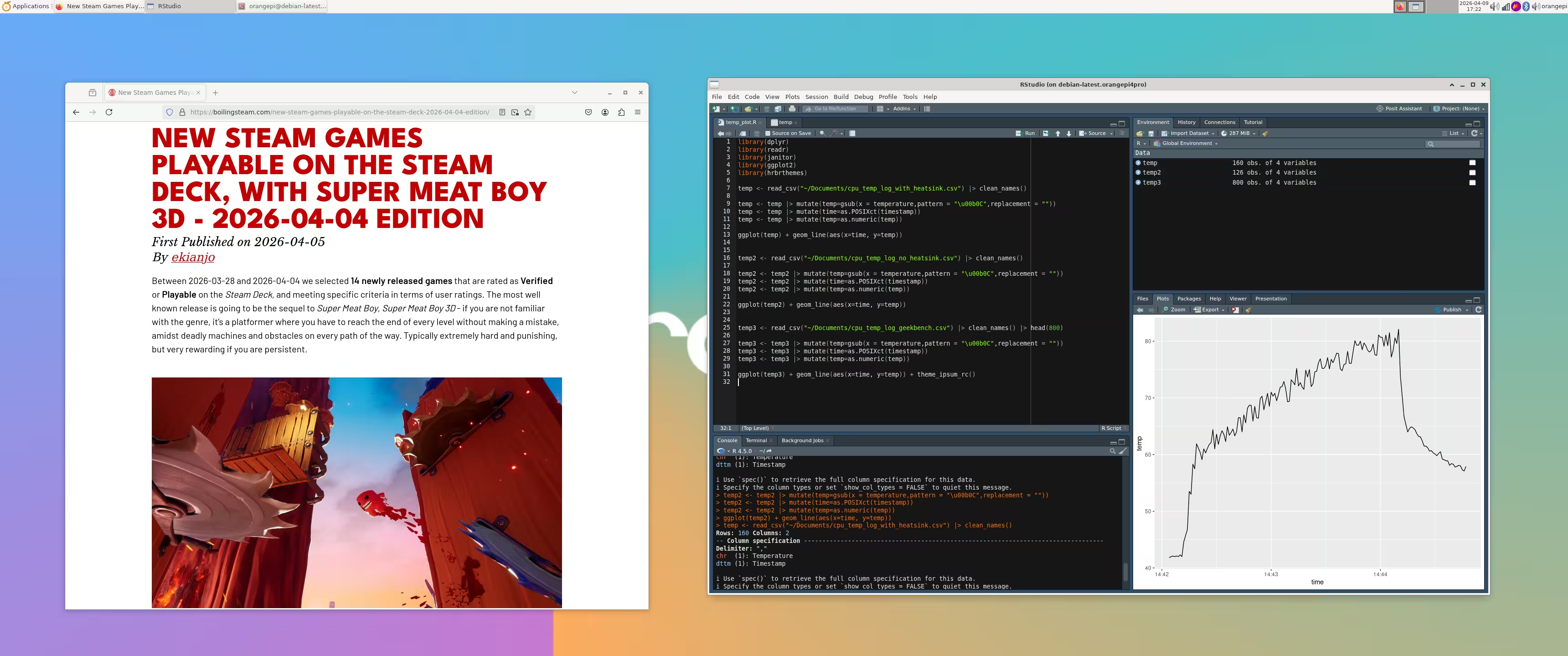
So, it definitely feels a bit slower than the Orange Pi 5 Ultra board, but not sluggish either. The biggest drawback is the lack of GPU acceleration and the ancient distro version.
The best bet in the near future would be to rely on Armbian. At the time of writing, the OrangePi 4 Pro is not supported, because it’s still fairly new. But give it a year or two and the likelihood that there is a well maintained Orange Pi 4 Pro Armbian (community) port increases significantly.
Temperature Control
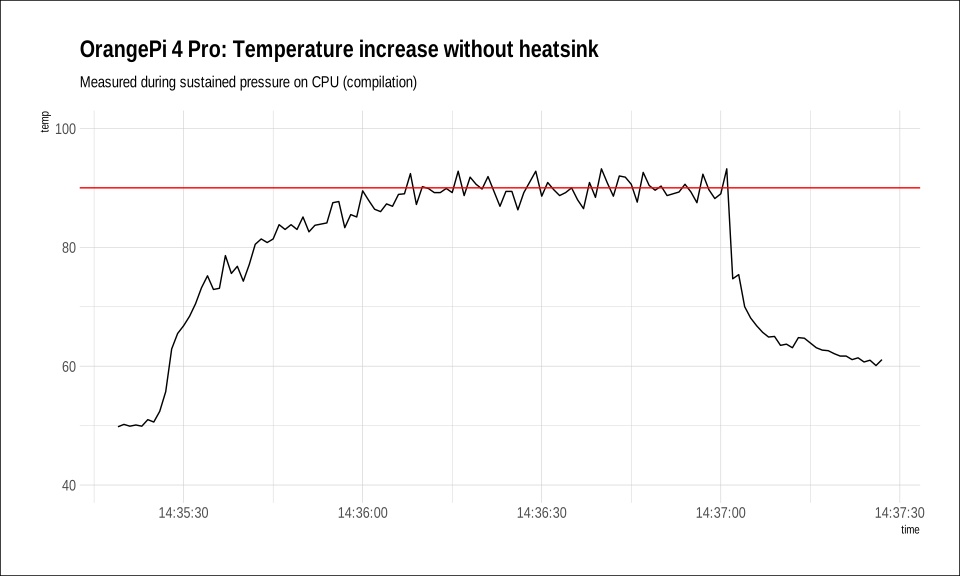
So, in my tests, I noticed very quickly that this little board performs very nicely, but the SOC tends of overheat like crazy. If you push it a little too hard, the temperature will skyrocket to 90C in no time, and at that point it will self-restraint (throttle) to manage the heat dissipation - which is great, but not what we want for maximum performance.
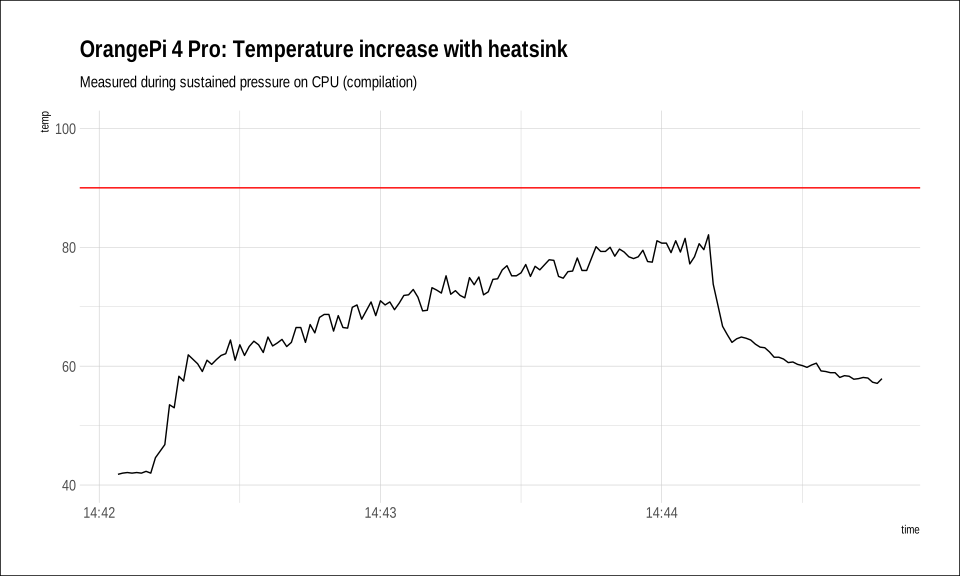
There is no official fan available for the OrangePi 4 Pro, so instead I went ahead with a generic aluminium heat sinks that can be used on such components. It does not completely solve overheating (you WILL reach 90C if you push things for too long), but it’s a massive improvement nonetheless, making the heat dissipation much better and letting the board perform in bursts for much longer.
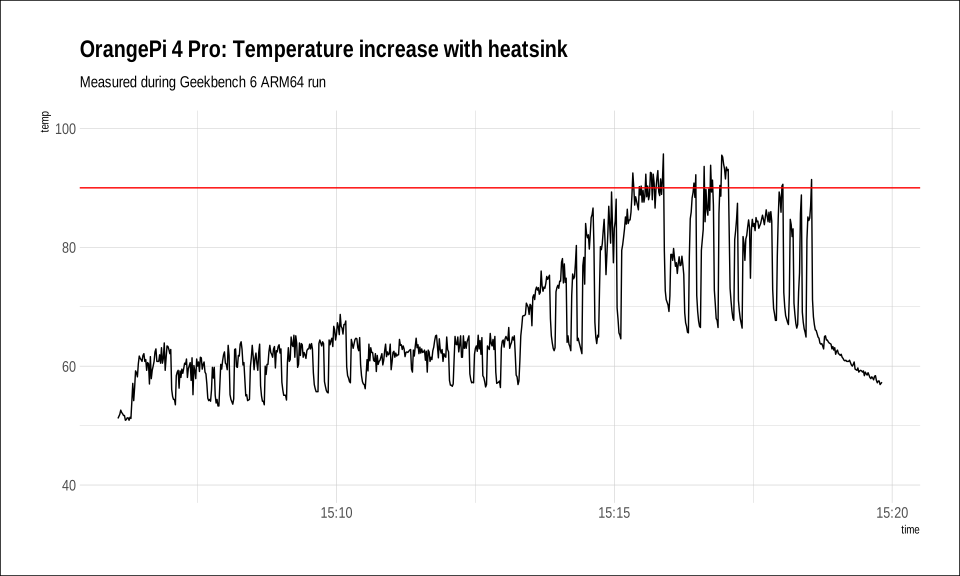
I did a longer run with Geekbench 6 ARM644 version. You will see that the first phase where only single processor benchmarks are used are completely manageable with the heatsink. But once the board starts doing a bunch of parallel processing tests, after a while you will get the 90C.
So the heatsink is not a perfect solution - you’ll want an active fan instead if you want to be on the super-safe side. However, in most typical usage scenarios, your board is not going to be running at 100% CPU usage all the time - and a heatsink will be a good enough, and silent alternative, that does the job.
Power Draw
The power draw is also a strong argument for server use. At idle (in desktop environment), the board only consumes about 4W. You can probably shave an extra watt when in pure headless mode.
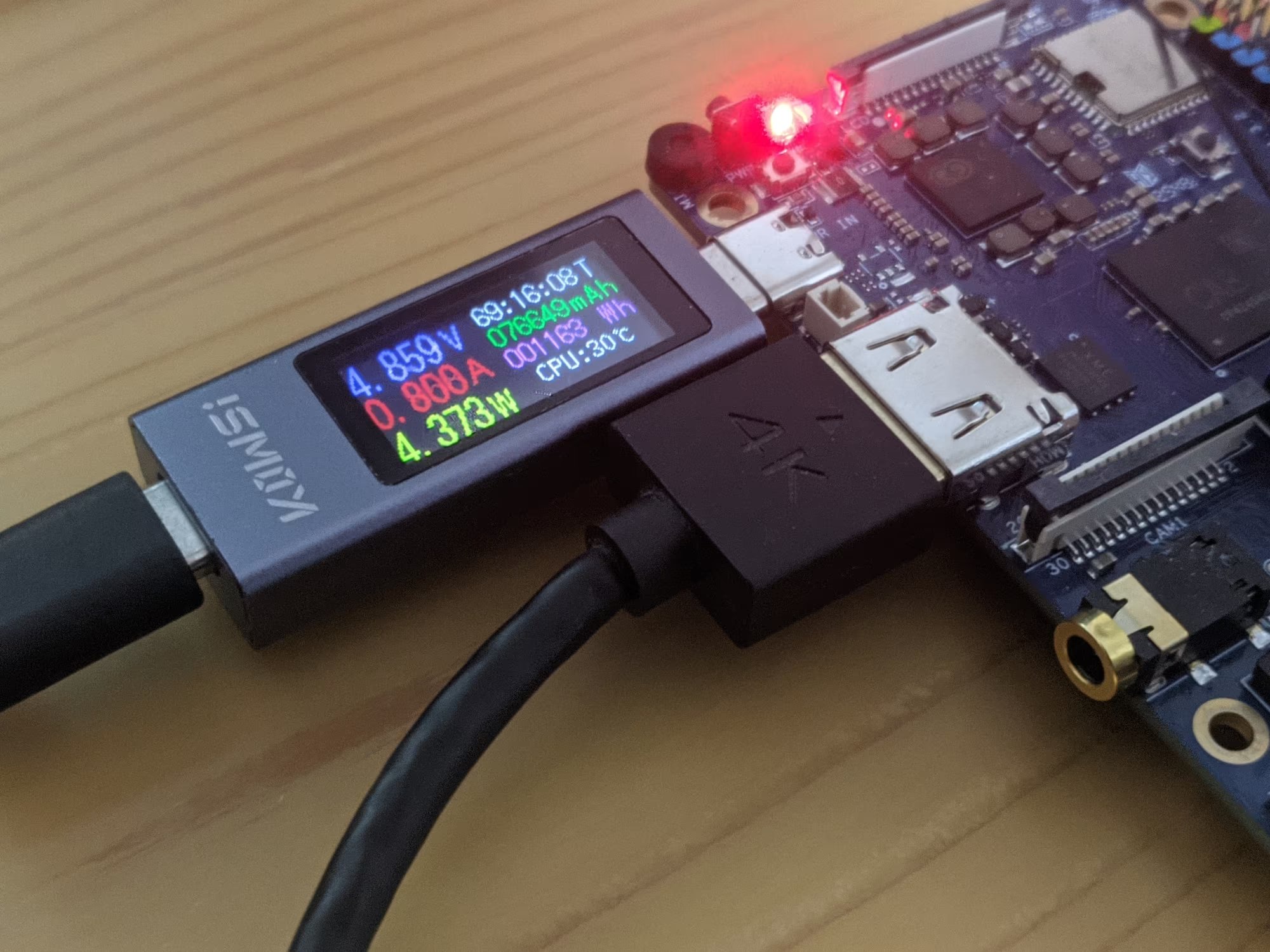
When stressing the board a little (I went browsing Full HD videos on Youtube in Full screen - it did make CPU usage go crazy since we don’t have GPU support), the consumption went up to just above 8W. Very impressive altogether.
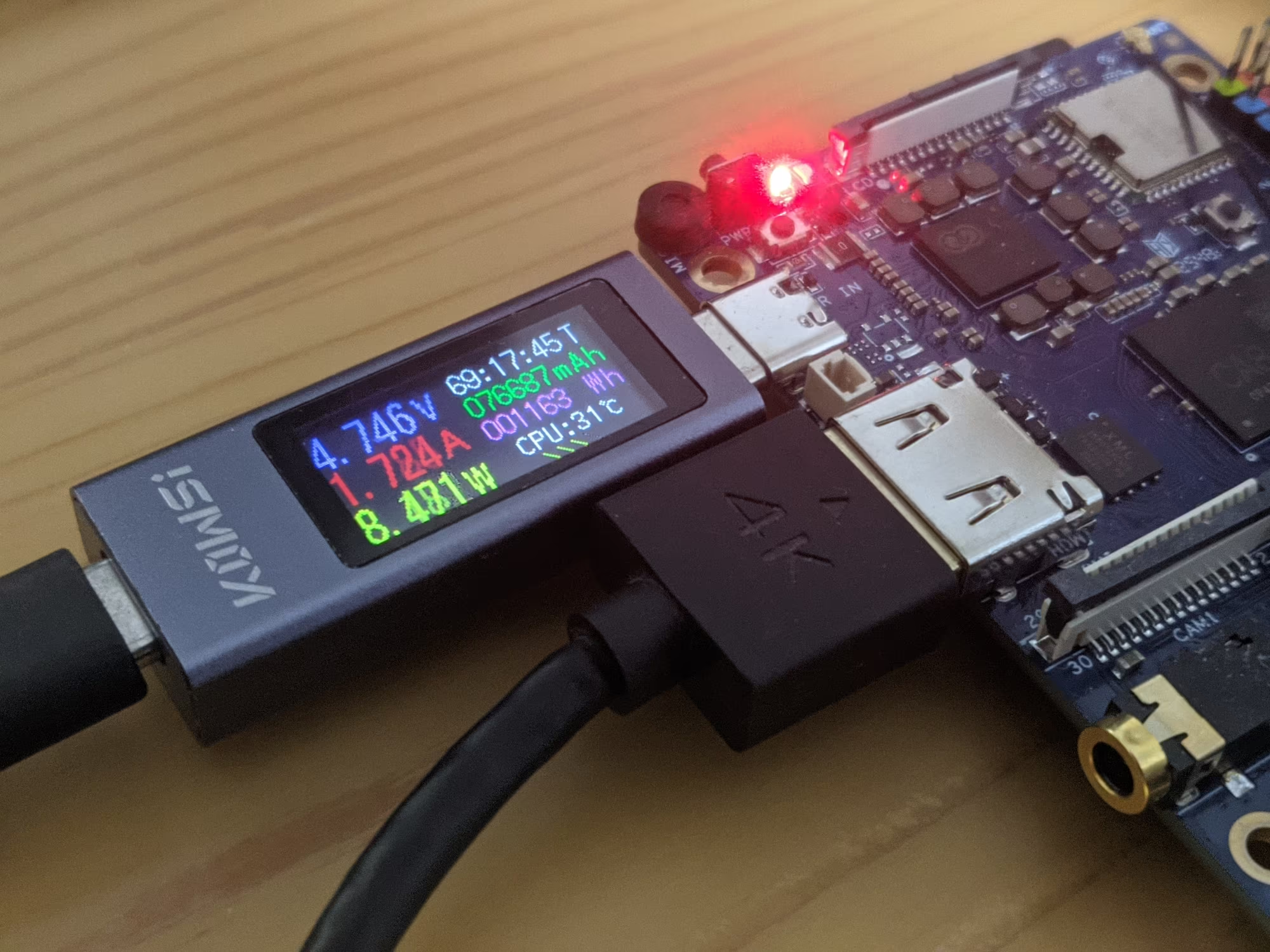
We have a very efficient system here. I tested it live also for server use (see below) and I was monitoring the wattage too. It rarely went above 5 or 6 W when using regular web apps, so the board seems an excellent choice if you care about saving on electricity bills when running a system 24/7.
Benchmarks
As usual I ran Geekbench ARM64 version. Here are the results. First, the overall picture:
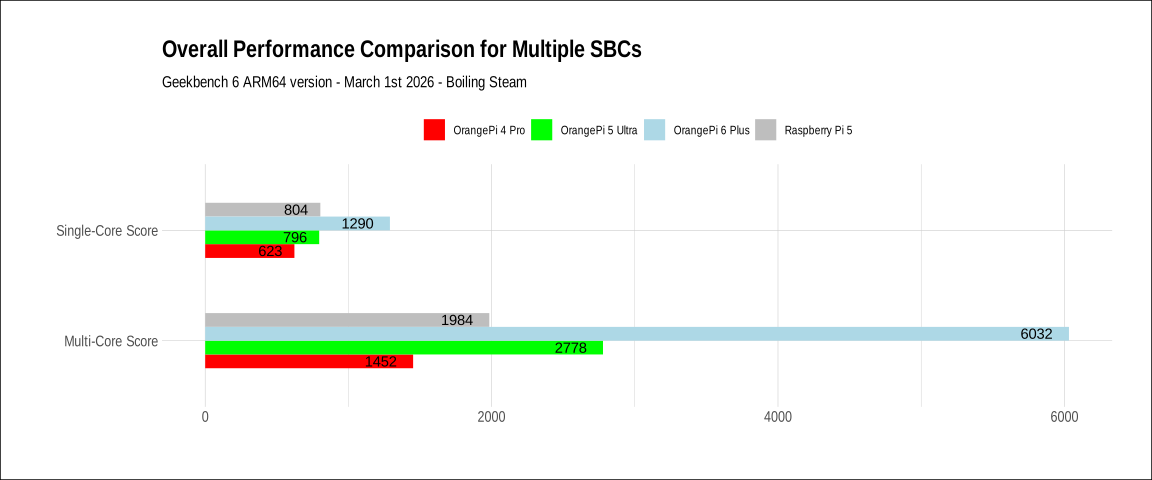
As you can see, in single core performance it’s within range of what you can expect from a Raspberry Pi 5, but it clearly loses when it comes to multiprocessor performance. The OrangePi 5 Ultra appears to be almost twice faster in multi-core tests.
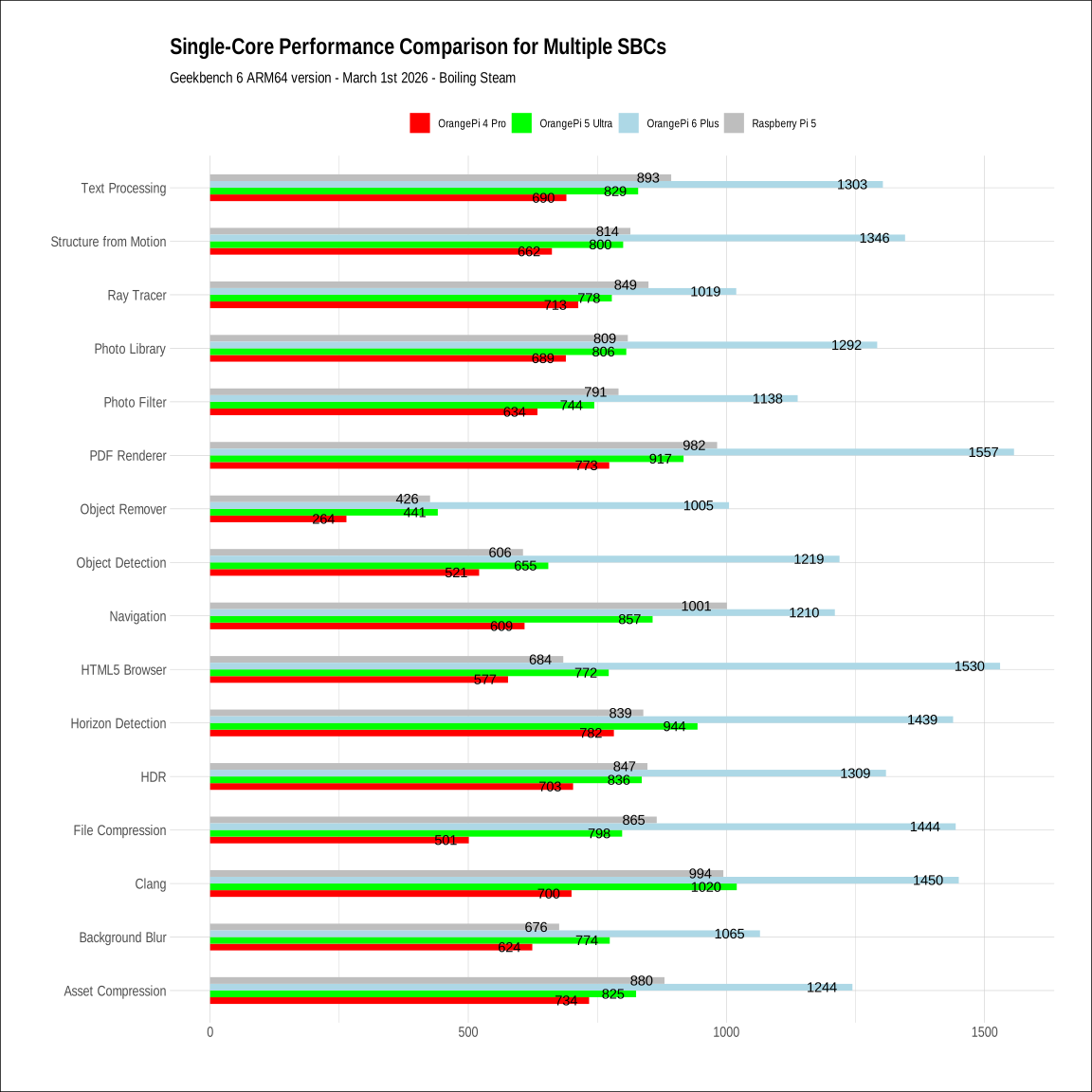
Single Core Benchs
If you’d like to see details…
Multi Core Benchs
And now the same thing when more parallel work:
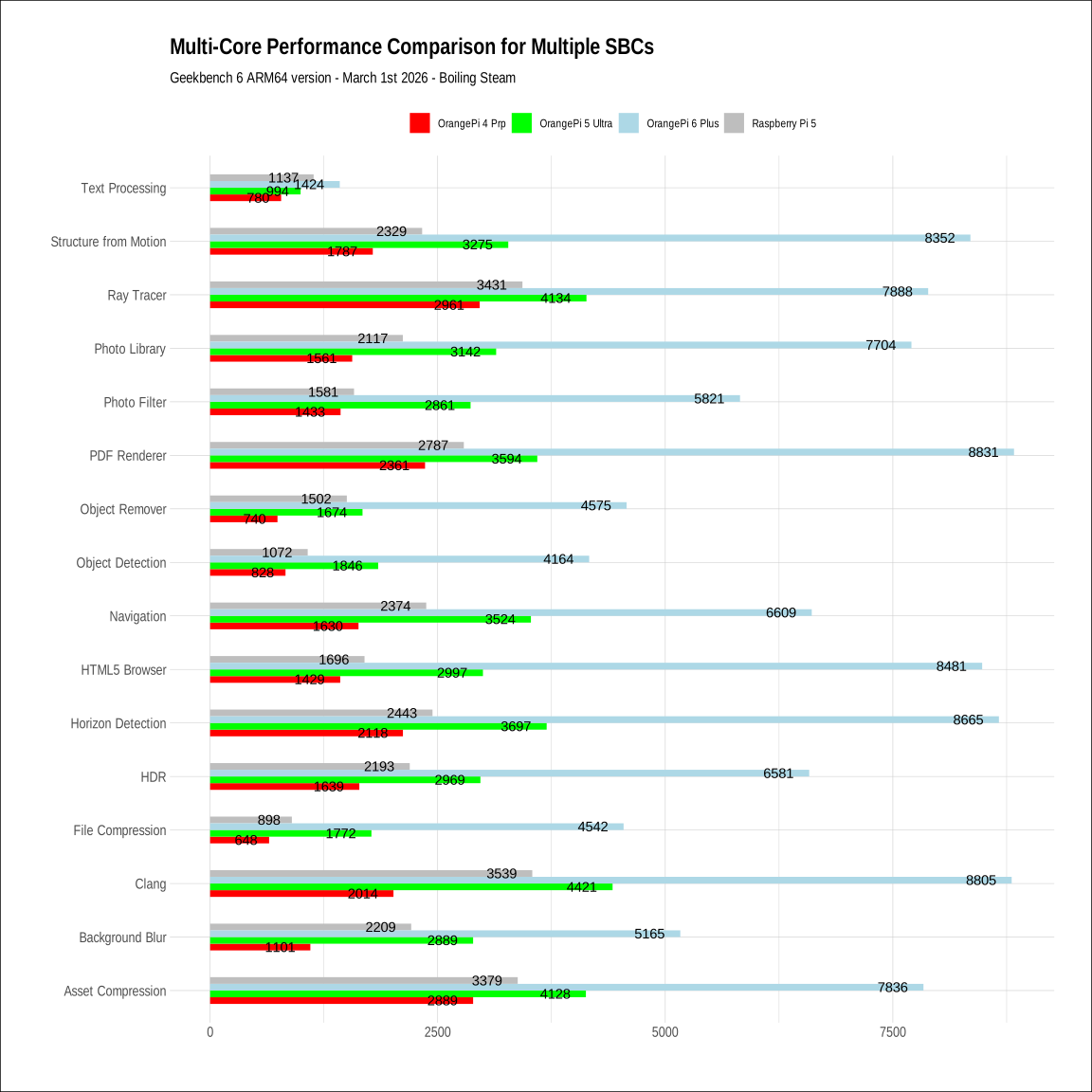
Not bad all things considered. It’s in the same class as the Raspberry Pi 5 in terms of performance, albeit a little slower overall. But as we will see later, it has a price point advantage at the moment.
Server Use
Since we are kind of on our own on the Linux desktop, with the lack of proper GPU acceleration, the other obvious use for this board is as a little server. This time I went ahead and prepared a fairly long docker compose file that had the following:
- Nextcloud 33
- MariaDB as a backend database for Nextcloud
- Prometheus for monitoring
- Grafana to visualize signals from Prometheus
- Home Assistant
- Jellyfin (for video streaming)
- Immich (photo manager)
- Immich machine learning module (to automatically tag pictures and people)
- Redis (needed for Immich)
- Postgres instance as a backend for Immich
And despite having all of this running at the same time, the board handles things very well. All of this software runs fairly quickly (even Immich), which is a good indicator that this board has great value if you want some headless operation. If you want to see it in action and know a bit more, you can find out a demonstration in the below video:
In case you were wondering, can this board be used for LLM inference? And I actually tested it for that. Initially my docker compose file had Ollama and Open Web UI as a chatbot-like UI interface. I started with Qwen3 1.7b, and I could not believe what I saw: even token took several seconds to appear. At first I thought this was a bug, but no. Out of the 8 processors only 2 are big and they are just not fast enough - I suspect the memory speed may also be a bottleneck. I tried an even smaller model with Qwen3 0.6b, and it struggled about the same.
Too bad! But at least, now you know: don’t expect to use this for light LLM usage.
Verdict
So right now, you could roughly divide the offering of Orange Pi into the following categories.
| Category | Model Example | Key Specs | Best For |
|---|---|---|---|
| Entry-Level | Orange Pi Zero 3 / RV | H618 or RISC-V SoC, <2GB RAM | Simple IoT, Pi-Hole, basic sensors |
| Mid-Range | Orange Pi 4 Pro | Allwinner A733, 4–16GB LPDDR5 | Edge ML, light NAS, 4K Media |
| High-End | Orange Pi 5 Ultra | RK3588, 6 TOPS NPU, 4K Video | Light Gaming, Heavy Multi-tasking |
| Workstation | Orange Pi 6 / AI Station | 12-core CPU, up to 176 TOPS AI | Local LLMs, AI Research, Mini-PC |
The Mid-Range is basically somewhat similar to what you get with a Raspberry Pi 5. This board benefits from having a direct M2 NVME port which makes I/O very fast, and LPDDR5 memory too. You get modern connectivity (Wifi 6 and BT 5.4) directly on the board, which is not often seen on other boards of the same category.
Now of course what matters is also pricing. And in this area, it looks like the OrangePi 4 Pro has an edge.
- Currently the Raspberry Pi 5 16GB version is out of stock, and latest pricing was at about 220 USD.
- It’s hard to find the OrangePi 4 Pro 16GB model right now, but the 12 GB model is at 125 USD.
- The OrangePi 5 Ultra 16Gb version sits at 280 USD on Amazon.com.
So it’s fairly clear that you are getting a very serious performance per dollar with the OrangePi 4 Pro. In these days of high RAM pricing, the 12GB version may be a good option if you are looking for home server or light desktop solution on the cheap.
Personally, I would recommend against using this board for Desktop Linux, because of the ancient distro and kernel proposed at the moment. However for server use, this almost does not matter as you can leverage docker containers and run the latest software on top of a relatively old distribution, without it making much of a difference. Instead, if you want hardware for a small desktop machine, the Orange Pi 5 Ultra or the Orange Pi 6 Plus are better options (while more pricey).
For server use, with its performance and its quite low power consumption, the Orange Pi 4 Pro is actually one of the best ARM64 board available out there right now at this pricepoint. If you go for it, do get a heatsink!